Collection Runner
Run every request in a collection or folder in order, many times, with data from a CSV or JSON file. · 4 min read
Open a collection's or folder's menu and choose Run collection (or Run folder).
- Untick any request you want to leave out. Requests run in the order of the tree.
- Set Iterations to run the whole list more than once, and an optional Delay between requests.
- Optionally choose a data file: a CSV with a header row, or a JSON list of objects. The run repeats once per row, and each row's values are available as
{{column}}in requests and aspm.iterationData.get('column')in scripts. - Tick Stop at the first failed test or error if later requests depend on earlier ones.
- Press Run.
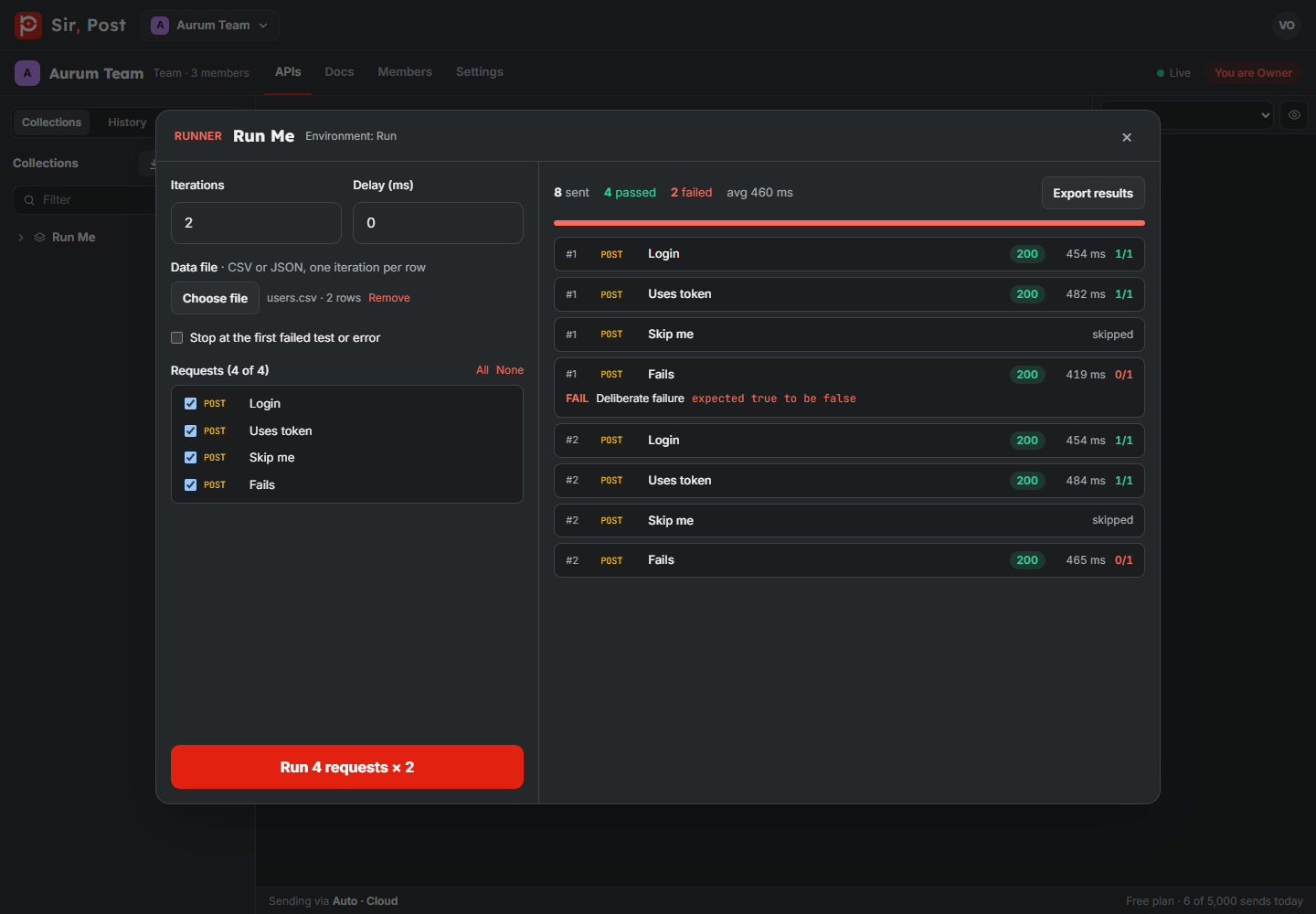
Each row shows the status, time and tests. Click a row to see failed assertions, script errors and console output. Export results downloads the run as JSON.
Order and flow
- Values saved with
pm.environment.setcarry on to the next request, so a Login request can feed the token to the rest. pm.execution.skipRequest()in a pre-request script skips that request.pm.execution.setNextRequest('Request name')jumps to another request in the run;setNextRequest(null)ends the current iteration.
Every send counts toward your daily limit and appears in History. Files picked for binary or form-data bodies are not sent by the runner.
Did this help? If not, ask us.
Next: Mock server →